LineNow
Use CasesPartnersProcurementSuppliersResources
LoginBook a Demo
LineNow
  • Use Cases
  • Suppliers
  • Pricing
Login
Book a Demo
Use cases/Churches

Churches · Purchase tracking

Track church purchases from request to receipt.

LineNow keeps church purchase requests, reviews, supplier orders, and receipts in one record. Follow a hospitality team’s paper-cup request through the office buyer and the volunteer who receives it.

Book a purchase-tracking demo→Follow the workflow ↓

90-day free trial · No credit card · See pricing

Church volunteers checking supplies for a community gathering
LineNowReceived

Community lunch supplies

One purchase record

Paper cups · 250 per case

Requested by
Hospitality team
Ordered
4 cases
Received
1,000 cups

✓ Request, order, and receipt together

Request→Purchase→TrackIllustrative workflow
01Request with context↗02Keep one supplier record↗03Record and hand over↗

01Request with context

Put the need in a request.

Capture supplies, quantities, and when they are needed. Use your configured approval rules so the right person reviews purchases before they go to a supplier.

  • ✓Name the requesting team and the purpose of the purchase.
  • ✓Record the quantity and when it is needed.
  • ✓Route the request through the configured approvers.

↳The buyer knows who asked and what is needed.

LineNow

A request with an owner

Community lunches · 1,000 paper cups

  1. Requested byHospitality team
    ↓
  2. ApprovalReview request
    ↓
  3. PurchasingOffice buyer
Illustrative workflow · Example quantities

02Keep one supplier record

Keep the supplier order visible.

Send the PO and keep supplier confirmations, date changes, and replies with it. Staff can follow an order without searching another person’s inbox.

  • ✓Send the order with the correct supplier pack size.
  • ✓Attach confirmations and changed delivery dates.
  • ✓Let another staff member follow up from the same order.

↳A change of volunteer does not lose the order history.

Church volunteers reviewing supplies for a community gathering
LineNow

One supplier order

Paper cups · Community lunches

4cases ordered
×
250cups per case
=
1,000 cupsExpected delivery
Illustrative workflow · Example quantities

03Record and hand over

Record the receipt.

Check what arrived, record partials, and keep supporting documents with the purchasing record. Review past orders before buying the same supplies again.

  • ✓Check the delivered quantity against the supplier order.
  • ✓Retain the receipt and supporting documents.
  • ✓Use past purchasing records to review the next request.

↳The team can distinguish ordered from received.

LineNow

An easy volunteer handoff

Paper cups · Purchase history

  1. Requested1,000 cups
    ↓
  2. Ordered4 cases
    ↓
  3. Received1,000 cups
Illustrative workflow · Example quantities

Inside LineNow

Give the next person the same purchasing record.

The receiving workspace brings the order and what arrived together. Your team can review quantities and differences before the purchasing record moves to the next step.

Explore purchase order tracking →
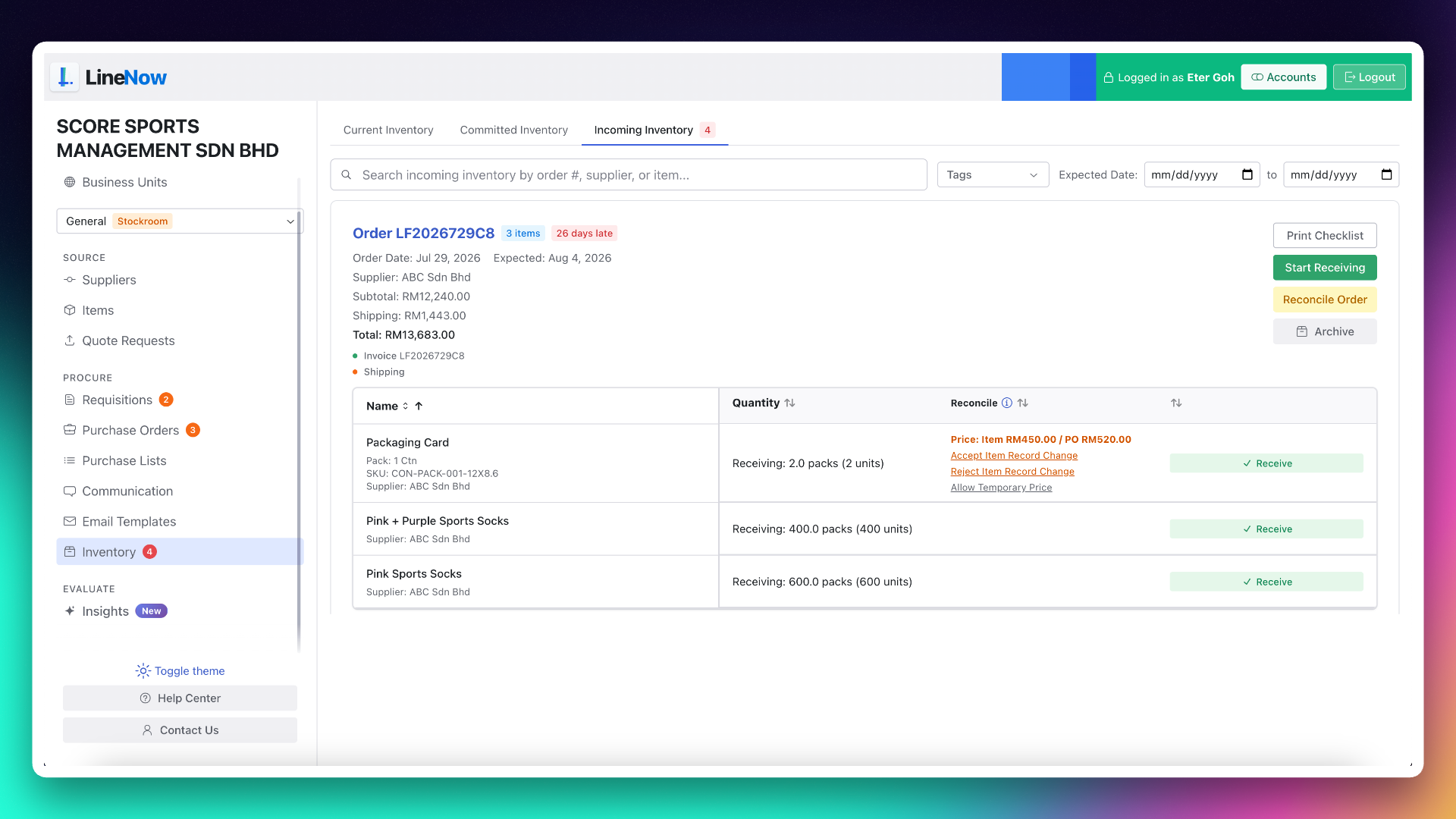
LineNow incoming inventory workspace for receiving orders and reviewing delivery differences
LineNow receiving workspace. Example business data shown. View full size ↗

Make it work for your team

A clear record for each role.

Set up purchasing around the people who request, approve, order, and receive.

Walk through your setup →
Staff and volunteers
Requests capture requirements and notes so the person placing the order can review the context.
Approvers and buyers
Configure requisition approvals for the business unit and designate who handles supplier purchasing.
Receiving teams
Use the purchasing record to check deliveries and retain receipt information for later review.
Bookkeeping
Use a supported accounting handoff such as QuickBooks Online where configured. Church fund accounting and donation management remain with your existing systems.

Practical questions

Before you connect the workflow.

Understand the setup, the handoffs, and what your team reviews along the way.
Connect the next part of the work.

QuickBooks

Review the purchase-to-bill accounting handoff.

→
Requests and approvals

See how a request reaches the purchasing team.

→
Order tracking

Keep confirmations and deliveries attached to the PO.

→

Walk through your own workflow

Give the next volunteer the full purchasing story.

Bring a recent event or supplies purchase. See how the request, supplier order, and delivery record stay connected.

Book a purchase-tracking demo→

90-day free trial · Guided setup · View plans and pricing

Line Now Logo
Procurement and supplier operations — simplified.Based in Seattle, WA

Product

  • Procurement Platform
  • Purchase Order Software
  • Supplier Management
  • PO Status Tracking
  • Procurement Items

Suppliers

  • Partners & Integrations
  • Purchasing Use Cases
  • Supplier Platform
  • Supplier Sign Up

Business Types

  • Food & Beverage
  • Retail
  • Manufacturing
  • Regulated Industries
  • Dropshipping

Resources

  • Pricing
  • Blog
  • Supplier Management Software
  • Inventory Replenishment Software
  • Purchase Order Automation
  • EOQ Formula
  • Free Tools
  • PAR Level Calculator
  • PO Generator
  • Demand Pattern Classifier
  • Order Guide Builder
  • Reorder Point Calculator
  • Safety Stock Calculator
  • Food Cost Calculator
  • Free Templates
  • Help Center

LineNow vs

  • Odoo
  • Unleashed
  • Ordoro
  • Ramp
  • BILL
  • Procurify
  • Precoro
  • Tradogram
  • Cin7
  • MRPeasy
  • Inventory Planner
  • MarketMan
  • Crunchtime
  • Supy
  • Choco
  • Craftable
  • xtraCHEF

Marketplace

  • Square
  • Shopify
  • Google
  • Capterra
  • GetApp
  • Software Advice
  • SourceForge
  • Slashdot
  • Product Hunt

Company

  • Why LineNow
  • Terms
  • Privacy
  • Contact
© 2026 Line Now LLC