
LineNow
Use CasesPartnersProcurementSuppliersResources
LoginBook a Demo
LineNow
  • Use Cases
  • Suppliers
  • Pricing
Login
Book a Demo
Partners/QuickBooks for Finance teams
LineNow+QuickBooks

QuickBooks for finance teams

Purchasing and receiving, ready for QuickBooks Online.

LineNow keeps supplier orders, replies, and receipts together before the QuickBooks Online bill handoff. Ten cases ordered, eight received: give the bookkeeper the delivery evidence before reviewing the bill.

Book a QuickBooks demo→Follow the workflow ↓

90-day free trial · No credit card · See pricing

Finance and operations lead reviewing a packing-supply delivery and its paperwork
LineNowFor review

Purchase-to-bill handoff

Delivery reviewed

Packing supplies · PO 1048

Ordered
10 cases
Received
8 cases
Receipt value
$320.00

✓ Review the bill details before sending

PO→Receive→AccountingIllustrative workflow
01Keep the purchasing context↗02Review what arrived↗03Hand over to accounting↗

One buyer. One purchasing story.

For the finance lead who needs to know what happened at the loading dock.

In this example, a small distributor orders ten cases of packing supplies. Eight arrive. The finance lead needs the PO, delivery record, and supplier documents together before preparing the QuickBooks bill—without asking the warehouse to reconstruct the day.

A short delivery should reach the books with its context intact.Illustrative business and quantities.
Purchase
10 cases · $40 each
First receipt
8 cases · $320 value
Still due
2 cases

Where LineNow fits

QuickBooks Online Plus and Advanced have native purchase orders and support adding part of a PO to a bill or expense. See QuickBooks’s native workflow ↗

LineNow organizes the supplier conversation and delivery evidence before the accounting handoff. Your team still reviews the bill, account mappings, tax, freight, and any differences.

A good fit when buyers and receivers work separately from the bookkeeper, and delivery differences need resolving before bills reach the accounts.

01Keep the purchasing context

Keep the order current.

Send the supplier PO and retain the conversation as quantities, prices, and delivery dates change. Purchasing context stays with the order.

  • ✓Retain the supplier, pack quantity, and agreed cost.
  • ✓Keep later supplier changes with the current order.
  • ✓Preserve the original purchase context for the bookkeeper.

↳The original request and later changes are traceable.

The finance lead reviewing a packing-supply purchase near the warehouse
LineNow

The original purchase

Packing supplies · PO 1048

10cases ordered
×
$40per case
=
$400Purchase order value
Illustrative workflow · Example quantities

02Review what arrived

Review what was received.

Record partial deliveries and inspect differences. Keep receipt information and supporting documents with the purchasing workflow before the accounting handoff.

  • ✓Record the eight cases that arrived and the two still due.
  • ✓Keep the packing slip and quantity differences with the receipt.
  • ✓Give the bookkeeper the delivery evidence before the bill review.

↳The delivery record explains the quantity received.

The same finance lead confirming a short delivery with the warehouse colleague
LineNow

The delivery was short

Packing supplies · PO 1048

10 cases ordered
✓✓✓✓✓✓✓✓
Received8 casesReceived
Still due2 casesOutstanding

Receipt value · $320

Illustrative workflow · Example quantities

03Hand over to accounting

Send the accounting transaction.

Review the supplier bill against the order and delivery record. Check the accounts, tax, freight, and any differences, then send the bill or vendor credit through your QuickBooks Online connection.

  • ✓Review the supplier, item, and account mappings.
  • ✓Send the reviewed bill or vendor credit to QuickBooks Online.
  • ✓Keep the delivery record available when the bookkeeper reviews a difference.

↳The bookkeeper can see the purchase, receipt, and bill together.

The finance lead reviewing the delivery paperwork and bill at a warehouse office desk
LineNow

A clear accounting handoff

QuickBooks Online

  1. Purchasing evidencePO + receipt
    ↓
  2. Bookkeeper reviewBill details
    ↓
  3. Accounting handoffQuickBooks Online
Illustrative workflow · Example quantities

Inside LineNow

Give the next person the same purchasing record.

The receiving workspace brings the order and what arrived together. Your team can review quantities and differences before the purchasing record moves to the next step.

Explore purchase order tracking →
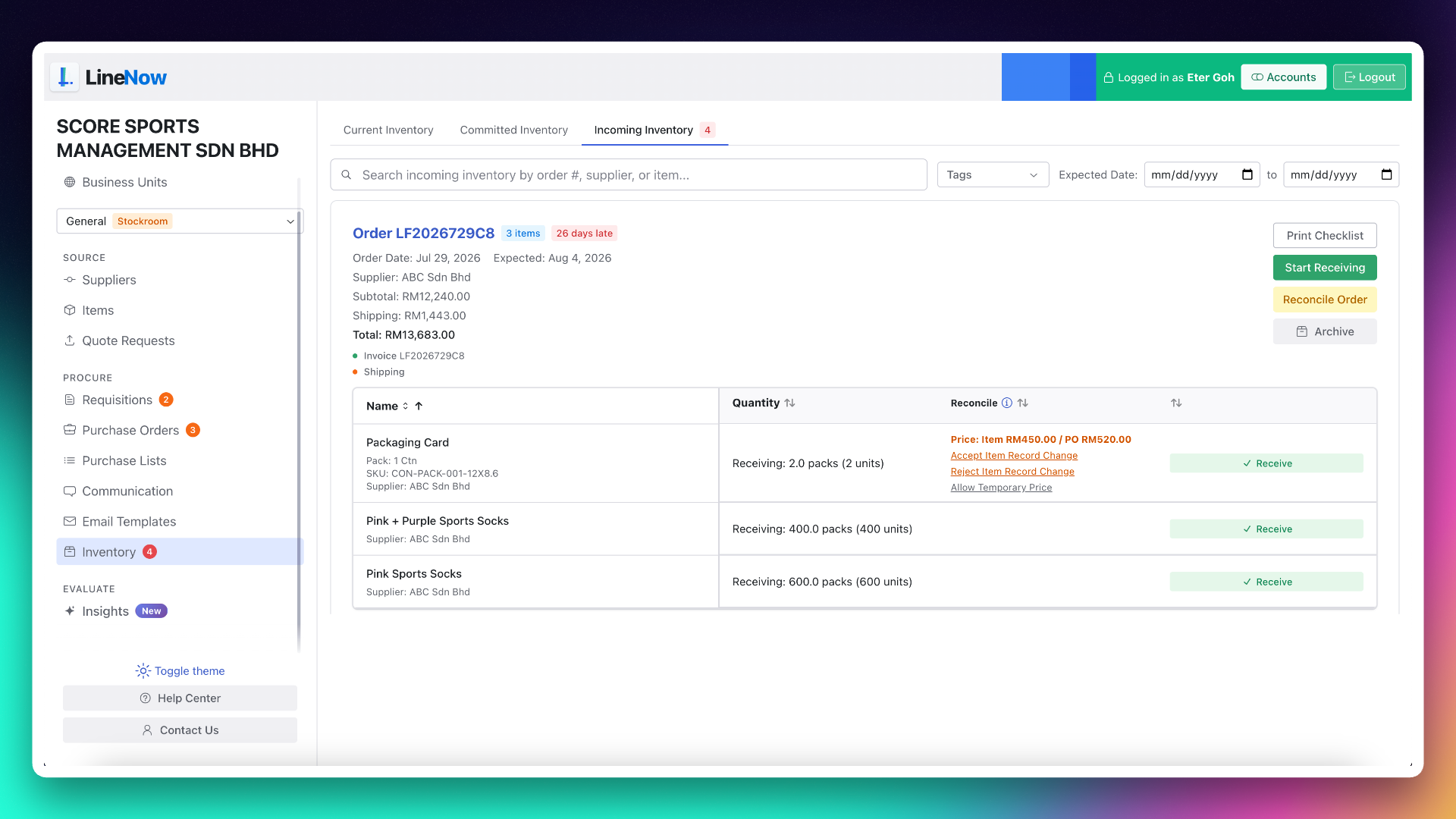
LineNow incoming inventory workspace for receiving orders and reviewing delivery differences
LineNow receiving workspace. Example business data shown. View full size ↗

Connection details

What goes to QuickBooks Online?

Connect the purchasing record to the accounts your bookkeeper uses.

Walk through your setup →
Bills and vendor credits
Send reviewed bills and vendor credits to QuickBooks Online using the supplier, item, and account mappings agreed during setup.
Optional inventory connection
A separate configured connection supports inventory synchronization for tracked items. QuickBooks quantities are company-wide, not independent stock totals for each location.
Timing and review
Your team reviews the transaction before sending it to accounting. A short delivery stays visible while the bookkeeper checks the supplier bill.
Getting started
Connect the QuickBooks Online company, review item and account mappings, and verify a purchase, receipt, and accounting transaction with the person responsible for your books.

Practical questions

Before you connect the workflow.

Understand the setup, the handoffs, and what your team reviews along the way.

Connect the work before the bill.

Commerce-to-accounting guide

Follow the purchasing work between store demand and the books.

→
Church purchasing

Keep requests, orders, and receipt history together.

→
Shopify

Start the buying decision from store demand and stock.

→

Walk through your own workflow

Make the next handoff easier to follow.

Bring a supplier order and a recent receipt. Review the QuickBooks mapping with the people who buy and the person who keeps the books.

Book a QuickBooks demo→

90-day free trial · Guided setup · View plans and pricing

Line Now Logo
Procurement and supplier operations — simplified.Based in Seattle, WA

Product

  • Procurement Platform
  • Purchase Order Software
  • Supplier Management
  • PO Status Tracking
  • Procurement Items

Suppliers

  • Partners & Integrations
  • Purchasing Use Cases
  • Supplier Platform
  • Supplier Sign Up

Business Types

  • Food & Beverage
  • Retail
  • Manufacturing
  • Regulated Industries
  • Dropshipping

Resources

  • Pricing
  • Blog
  • Supplier Management Software
  • Inventory Replenishment Software
  • Purchase Order Automation
  • EOQ Formula
  • Free Tools
  • PAR Level Calculator
  • PO Generator
  • Demand Pattern Classifier
  • Order Guide Builder
  • Reorder Point Calculator
  • Safety Stock Calculator
  • Food Cost Calculator
  • Free Templates
  • Help Center

LineNow vs

  • Odoo
  • Unleashed
  • Ordoro
  • Ramp
  • BILL
  • Procurify
  • Precoro
  • Tradogram
  • Cin7
  • MRPeasy
  • Inventory Planner
  • MarketMan
  • Crunchtime
  • Supy
  • Choco
  • Craftable
  • xtraCHEF

Marketplace

  • Square
  • Shopify
  • Google
  • Capterra
  • GetApp
  • Software Advice
  • SourceForge
  • Slashdot
  • Product Hunt

Company

  • Why LineNow
  • Terms
  • Privacy
  • Contact
© 2026 Line Now LLC