

LineNow
Use CasesPartnersProcurementSuppliersResources
LoginBook a Demo
LineNow
  • Use Cases
  • Suppliers
  • Pricing
Login
Book a Demo
Partners/Square for Retail
RetailRestaurants
LineNow+Square

Square for retail

Purchase orders that keep up with your Square store.

LineNow connects Square retail stock to supplier purchase orders, case sizes, and receiving. Follow one shop’s reorder: eight olive-oil bottles on hand, four cases ordered, and three delivered.

Book a Square retail demo→Follow the workflow ↓

90-day free trial · No credit card · See pricing

Specialty-food shop buyer reviewing olive oil bottles on the shelf
LineNowReady to review

Supplier order draft

Olive oil · 500 ml

1 supplier case = 6 bottles

Square stock
8 bottles
Order quantity
4 cases
Units to receive
24 bottles

✓ Review the draft before sending

Square→Supplier PO→ReceiveIllustrative workflow
01Map the buying decision↗02Keep the supplier reply↗03Reconcile the delivery↗

One buyer. One purchasing story.

For the shop owner who also does the buying.

At the Market Street shop in this example, the owner chooses the range, watches the shelves, and follows up with suppliers. Olive oil is running low before weekend trade. The next delivery needs to make sense to whoever receives it.

One item. One shop. The same order from shelf check to short delivery.Illustrative business and quantities.
Retail item
Olive oil · 500 ml
Shop
Market Street
Supplier case
6 bottles

Where LineNow fits

Square has its own purchase orders, stock conversion, and partial receiving tools. See Square’s native workflow ↗

Choose LineNow when supplier options, replies, changes, and receiving need a shared purchasing record connected to your Square items.

A good fit when you buy from several suppliers, sell items individually, and need staff to follow the order through pack changes and short deliveries.

01Map the buying decision

Review the stock signal.

Bring Square catalog, sales, and stock information into the buying decision. Map the item you sell to the supplier item you purchase, including its case size.

  • ✓Keep the selling location attached to the stock signal.
  • ✓Link the Square item to a supplier SKU and case size.
  • ✓Review incoming orders before adding another purchase.

↳One sellable item, a clear purchasing option.

The specialty-food shop buyer checking olive oil on the shelf
LineNow

From cases to bottles

Olive oil · Market Street · 8 bottles on hand

4cases ordered
×
6bottles per case
=
24 bottlesOn the supplier order
Illustrative workflow · Example quantities

02Keep the supplier reply

Keep the supplier’s new plan with the PO.

Order four cases for Market Street. The supplier confirms three for Thursday and the last one for Monday. Keep that reply and the revised dates with the PO, so the person receiving knows what to expect.

  • ✓Review the supplier’s confirmation against the four-case PO.
  • ✓Keep revised dates with the order and its destination.
  • ✓Give receiving staff the current delivery plan.

↳Four cases on the PO means 24 bottles.

The same shop buyer reviewing a supplier message beside olive oil stock
LineNow

One order. Two deliveries.

Olive oil · 4 cases ordered

Supplier confirmation
Thursday
3 cases18 bottles
Monday
1 case6 bottles
Illustrative workflow · Example quantities

03Reconcile the delivery

Receive what arrived.

Check the three delivered cases against the four-case order. With the retail location connected, update the matching Square item and keep the last case visible for Monday.

  • ✓Record a partial receipt against the current order.
  • ✓Keep the missing case visible for the next delivery.
  • ✓Update the connected Square item at the shop receiving the delivery.

↳The receiving decision stays connected to stock.

The shop buyer checking olive oil cases during a partial delivery
LineNow

Receive the partial delivery

Olive oil · Market Street

4 cases ordered
✓✓✓
Received3 cases18 bottles
Due Monday1 case6 bottles
Illustrative workflow · Example quantities

Inside LineNow

Keep the supplier pack beside the order quantity.

A useful purchase order shows how the supplier sells an item and how many units your team needs. LineNow keeps pack sizes, unit costs, quantities, and order notes together while you build the PO.

See case and pack mapping →
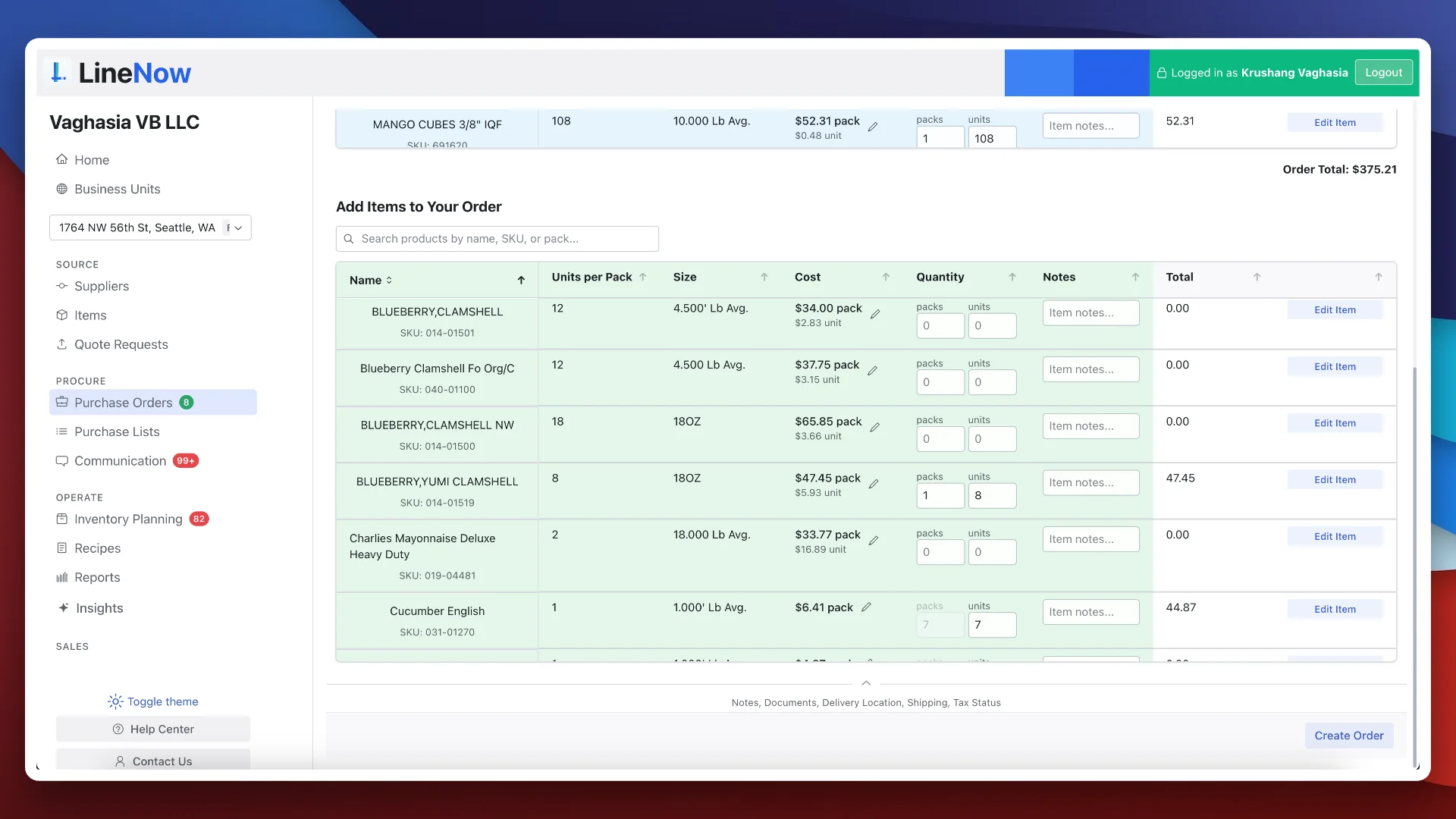
LineNow purchase order workspace showing units per pack, cost, quantity, and order notes
LineNow purchase order workspace. Example catalog shown. View full size ↗

Connection details

What connects to Square?

Set up the catalog and locations around how your business buys and sells.

Walk through your setup →
Catalog, sales, and stock → LineNow
Bring Square items, sales, refunds, and stock information into the purchasing workspace so the buyer can review what to reorder.
Mapped stock updates → Square
Match each LineNow item to Square and choose which retail or dropship locations receive stock updates. Confirm where receipts should update inventory during setup.
Supplier cases and selling units
Keep the supplier SKU, case size, and cost beside the individual bottle you sell. Review the buying unit before sending the first PO.
Getting started
Connect your Square account, select locations, map supplier packs, and walk through an order and receipt with the onboarding team.

Practical questions

Before you connect the workflow.

Understand the setup, the handoffs, and what your team reviews along the way.
Put the connection to work.

Square purchasing guide

Understand where native purchasing and supplier coordination meet.

→
Case and pack buying

Keep supplier quantities and retail units aligned.

→
QuickBooks

Continue from purchasing into your accounting handoff.

→

Walk through your own workflow

Walk through one of your actual reorders.

Bring a Square item, its supplier pack size, and a recent delivery. See how the order and receipt fit together.

Book a Square retail demo→

90-day free trial · Guided setup · View plans and pricing

Line Now Logo
Procurement and supplier operations — simplified.Based in Seattle, WA

Product

  • Procurement Platform
  • Purchase Order Software
  • Supplier Management
  • PO Status Tracking
  • Procurement Items

Suppliers

  • Partners & Integrations
  • Purchasing Use Cases
  • Supplier Platform
  • Supplier Sign Up

Business Types

  • Food & Beverage
  • Retail
  • Manufacturing
  • Regulated Industries
  • Dropshipping

Resources

  • Pricing
  • Blog
  • Supplier Management Software
  • Inventory Replenishment Software
  • Purchase Order Automation
  • EOQ Formula
  • Free Tools
  • PAR Level Calculator
  • PO Generator
  • Demand Pattern Classifier
  • Order Guide Builder
  • Reorder Point Calculator
  • Safety Stock Calculator
  • Food Cost Calculator
  • Free Templates
  • Help Center

LineNow vs

  • Odoo
  • Unleashed
  • Ordoro
  • Ramp
  • BILL
  • Procurify
  • Precoro
  • Tradogram
  • Cin7
  • MRPeasy
  • Inventory Planner
  • MarketMan
  • Crunchtime
  • Supy
  • Choco
  • Craftable
  • xtraCHEF

Marketplace

  • Square
  • Shopify
  • Google
  • Capterra
  • GetApp
  • Software Advice
  • SourceForge
  • Slashdot
  • Product Hunt

Company

  • Why LineNow
  • Terms
  • Privacy
  • Contact
© 2026 Line Now LLC